Skip to product information
1 of 16

xTool M2 Color Craft Laser Cutter & Engraver

xTool M2 Color Craft Laser Cutter & Engraver

Xtool

SKU:

Regular price $499.00 USD
Regular price Sale price $499.00 USD
Sale Sold out

Payment & Security

Payment Methods Accepted

Your payment information is processed securely. We do not store credit card details nor have access to your credit card information.

Shipping, Crating, and Packaging Fees

Additional Shipping & Crating Fees

Lawson made equipment comes with a Shipping and Crating Charge that is not included in the price shown and will not be reflected in your order's total. We will contact you after order completion with a final cost.

Download Product's PDF Brochure

Financing Options

Need to finance the xTool M2 Color Craft Laser Cutter & Engraver? No problem! Visit our Financing Page for more details.

Got a question about this product?

View full details

Description

The xTool M2 is an enclosed desktop laser cutter and engraver for custom gifts, wood crafts, personalized décor, and small-business projects. Choose a 10W, 20W, or 40W diode laser to match your cutting needs, then select a standalone machine or accessory bundle. Add full-color printing with the compatible CMYK inkjet module, available separately or in a bundle that includes it.support.

Create engraved wood signs, cut craft components, personalize leather goods, or combine printed artwork with laser-cut shapes. With the CMYK inkjet module installed, the M2 can print color graphics and cut or engrave compatible materials in the same machine—reducing the need to move projects between separate devices.

Choose Your Laser Power

  • 10W: A practical starting point for detailed engraving and everyday projects using thinner materials.
  • 20W: More cutting capacity for wood and black acrylic projects.
  • 40W: The highest-power M2 option for thicker materials and cutting-focused workflows.

Manufacturer-stated single-pass cutting capacities reach up to 8 mm basswood with the 10W module, 10 mm with the 20W module, and 15 mm with the 40W module. Actual results depend on the material, settings, and preparation.

Choose Your Machine and Bundle

Select your machine power and purchase bundle above. The Standalone configuration does not include the CMYK inkjet module. For full-color printing, choose a package that specifically lists the CMYK inkjet module among its included components. Rotary accessories, infrared modules, air purifiers, and other add-ons should only be considered included when listed for your selected bundle.

Dual cameras, automated focusing and material measurement, and built-in air assist help simplify project setup. The M2 supports xTool Studio on Windows and macOS, with USB and Wi-Fi connectivity.

For makers expanding into additional products, the optional M2 3W infrared module supports marking compatible metals and certain plastics, while compatible rotary accessories expand personalization options for cylindrical items.

The LWG Difference

Choose Your xTool M2 With Lawson Workhorse Group

Shop the xTool M2 through Lawson Workhorse Group to compare machine-power options, review available bundles, and discuss your equipment purchase with our team. Contact LWG before ordering if you need clarification on package contents, accessory compatibility, or pickup availability.

Purchase Options in One Place

Compare available M2 machine powers and bundle selections on one product page. Choose the configuration that matches the products you want to make, and verify the included accessories before checkout.

St. Louis and Atlanta-Area Locations

Contact our St. Louis, Missouri, headquarters or our Atlanta-area office in Marietta, Georgia, to discuss your order. Call ahead to confirm local pickup availability for your selected xTool M2 configuration.

  • St. Louis: 314-382-9300
  • Atlanta / Marietta: 770-424-3570

Financing Options

Explore LWG’s financing information when planning your equipment purchase. Contact our team to discuss the next steps for your selected machine and bundle.

Features

10W, 20W, or 40W Diode Laser Options

Match laser power to your materials and production needs. The 10W configuration suits detailed engraving and thinner-material projects, while 20W and 40W options provide greater cutting capacity. xTool lists maximum single-pass basswood cutting capacities of 8 mm, 10 mm, and 15 mm, respectively.

Optional Full-Color CMYK Printing

Install the compatible CMYK inkjet module to print full-color designs with a dedicated black ink channel. Combine printing with laser cutting or engraving for personalized signs, gift tags, decorations, and other compatible craft projects. The CMYK module is not included with the Standalone machine.

Dual-Camera Project Positioning

A 5MP distant-view camera and a 2MP close-view camera help you preview the work area and position designs. This visual workflow supports alignment for engraving, cutting, and print-then-cut projects.

Automated Setup With ACS

The Automated Creation System, or ACS, can photograph the work area, align the image, focus, and measure material thickness. With supported QR-coded xTool materials, the software can also identify the material and provide processing parameters.

Built-In Adjustable Air Assist

The M2 includes an integrated air pump with adjustable output for cutting and engraving. No separate air-assist pump is required, and the machine does not support connecting a third-party external air pump.

Optional Infrared Metal Marking

Add the compatible M2 3W infrared module to mark supported metals and certain plastics. This optional module expands material compatibility; it is not a substitute for a dedicated metal-cutting system.

Rotary Accessory Compatibility

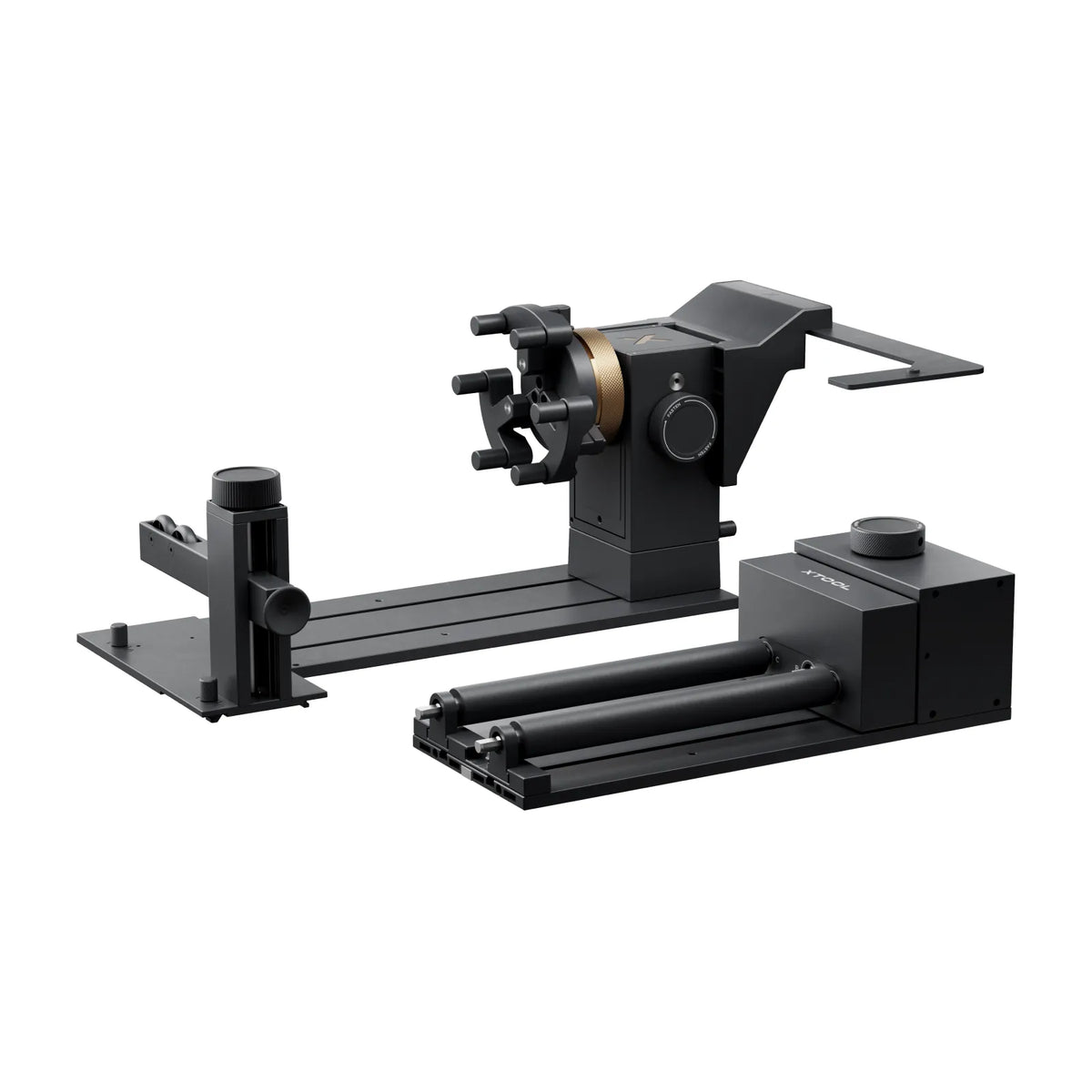
The M2 supports the compatible RA3 Lite rotary accessory for cylindrical-object projects. xTool describes horizontal laser processing for suitable objects up to 100 mm in diameter without a riser base; confirm the accessory, fixture, and object requirements for your project.support.

Enclosed Class 1 Laser Design

The M2 is classified as a Class 1 laser device under normal operating conditions. Interlocks stop laser operation when the protective cover opens or the baseplate is removed. Follow the operating instructions and material restrictions for every project.

xTool Studio Software

Prepare and send projects through xTool Studio on Windows or macOS. Connect by USB or Wi-Fi and work with supported formats including SVG, DXF, JPG, JPEG, PNG, and BMP. The M2 is not compatible with LightBurn or xTool Creative Space, also called XCS.

Media & Videos

Specifications Table

Specification | 10W Model | 20W Model | 40W Model
Machine Type | Enclosed diode laser cutter and engraver | Enclosed diode laser cutter and engraver | Enclosed diode laser cutter and engraver
Diode Laser Output | 10W | 20W | 40W
Laser Processing Area | 426 × 320 mm | 426 × 320 mm | 426 × 312 mm
Maximum XY Movement Speed | 600 mm/s | 600 mm/s | 600 mm/s
Single-Pass Basswood Cutting Capacity | Up to 8 mm | Up to 10 mm | Up to 15 mm
Single-Pass Black Acrylic Cutting Capacity | Up to 3 mm | Up to 8 mm | Up to 11 mm
Positioning Cameras | 5MP distant-view + 2MP close-view | 5MP distant-view + 2MP close-view | 5MP distant-view + 2MP close-view
Automated Setup | ACS imaging, focusing and thickness measurement | ACS imaging, focusing and thickness measurement | ACS imaging, focusing and thickness measurement
Air Assist | Built-in adjustable air pump | Built-in adjustable air pump | Built-in adjustable air pump
Optional Color Printing Module | M2 CMYK inkjet module | M2 CMYK inkjet module | M2 CMYK inkjet module
CMYK Printing Area with Automatic Capping | 300 × 284 mm | 300 × 284 mm | 300 × 284 mm
CMYK Printing Area without Automatic Capping | 370 × 284 mm | 370 × 284 mm | 370 × 284 mm
Optional Infrared Module | M2 3W infrared module | M2 3W infrared module | M2 3W infrared module
Infrared Processing Area | 412.5 × 310 mm | 412.5 × 310 mm | 412.5 × 310 mm
Compatible Rotary Accessory | xTool RA3 Lite | xTool RA3 Lite | xTool RA3 Lite
Compatible Software | xTool Studio | xTool Studio | xTool Studio
Operating Systems | Windows and macOS | Windows and macOS | Windows and macOS
Connectivity | USB and Wi-Fi | USB and Wi-Fi | USB and Wi-Fi
Supported File Formats | SVG, DXF, JPG, JPEG, PNG and BMP | SVG, DXF, JPG, JPEG, PNG and BMP | SVG, DXF, JPG, JPEG, PNG and BMP
LightBurn Compatibility | Not supported | Not supported | Not supported
XCS Compatibility | Not supported | Not supported | Not supported
Laser Safety Classification | Class 1 under normal operating conditions | Class 1 under normal operating conditions | Class 1 under normal operating conditions
Machine Dimensions | 610 × 569 × 180 mm | 610 × 569 × 180 mm | 610 × 569 × 180 mm
Conveyor Compatibility | Not supported | Not supported | Not supported
CMYK Module Included with Standalone | No | No | No
Other Included Accessories | Depend on selected bundle | Depend on selected bundle | Depend on selected bundle

Comparison Table

Comparison | 10W Model | 20W Model | 40W Model
Primary Use | Detailed engraving and thinner-material crafts | Engraving with greater cutting capacity | Cutting-focused projects and thicker compatible materials
Diode Laser Output | 10W | 20W | 40W
Laser Work Area | 426 × 320 mm | 426 × 320 mm | 426 × 312 mm
Single-Pass Basswood Cutting | Up to 8 mm | Up to 10 mm | Up to 15 mm
Single-Pass Black Acrylic Cutting | Up to 3 mm | Up to 8 mm | Up to 11 mm
Color Printing | Requires M2 CMYK inkjet module | Requires M2 CMYK inkjet module | Requires M2 CMYK inkjet module
Infrared Metal Marking | Requires M2 3W infrared module | Requires M2 3W infrared module | Requires M2 3W infrared module
Rotary Engraving | Requires compatible rotary accessory | Requires compatible rotary accessory | Requires compatible rotary accessory
Dual-Camera Positioning | Included | Included | Included
Built-In Air Assist | Included | Included | Included
Software | xTool Studio | xTool Studio | xTool Studio
Choose This Model For | Engraving and thinner-material projects | A balance of engraving and increased cutting capacity | The highest cutting capacity in the M2 lineup
Accessory Inclusion | Confirm selected bundle contents | Confirm selected bundle contents | Confirm selected bundle contents

Questions & Answers

What is the xTool M2 Color Craft Laser Cutter & Engraver?

The xTool M2 is an enclosed desktop machine for diode laser cutting and engraving. It supports 10W, 20W, and 40W laser modules, plus optional CMYK inkjet printing and a compatible 3W infrared module for additional marking applications.

Does every xTool M2 include color printing?

No. The Standalone M2 does not include the CMYK inkjet module. To print in color, select a bundle that expressly includes the M2 CMYK inkjet module or purchase the compatible module separately.

Should I choose the 10W, 20W, or 40W M2?

Choose based on the materials and thicknesses you plan to process. The 10W option suits thinner-material crafts and detailed engraving; the 20W offers greater cutting capacity; and the 40W provides the highest cutting capacity in the M2 lineup. xTool advertises single-pass basswood cutting up to 8 mm, 10 mm, and 15 mm, respectively.

What comes in each xTool M2 bundle?

Contents depend on the selected package. Check the itemized list for the exact machine power, printing module, rotary accessory, filtration equipment, materials, and consumables included. Do not assume an accessory is included because it appears in a product photo or demonstration video. The Standalone configuration does not include CMYK printing.xtool+1

What materials can the xTool M2 cut?

With the appropriate diode module and settings, the M2 can cut compatible wood, paper, cardboard, leather, and suitable opaque acrylic. Compatibility depends on the material’s composition and the installed module. Check xTool’s material guidance before processing unfamiliar materials.

Can the xTool M2 cut vinyl?

Do not laser-cut vinyl containing PVC. xTool warns that PVC-containing vinyl produces toxic and corrosive gases during laser processing. The M2 does not support physical blade cutting, so it should not be treated as a general-purpose vinyl cutter.

Can the xTool M2 engrave metal?

Yes, with the appropriate module and material. The optional M2 3W infrared module supports marking compatible metals, including stainless steel, copper, aluminum, and precious metals. Diode-laser compatibility is more limited, and xTool warns against processing certain highly reflective metal surfaces with the blue-light module.

How large is the xTool M2 work area?

The 10W and 20W diode modules have a 426 × 320 mm processing area. The 40W module has a 426 × 312 mm area. Infrared engraving and CMYK printing use different processing areas, so confirm the limits for your installed module.

Can the xTool M2 print directly on glass or metal?

Not on untreated smooth surfaces. xTool states that glass, metal, and ceramic require a suitable ink-receptive coating because the ink does not adhere properly to those surfaces on its own. Always follow the material-preparation instructions for your application.

Are xTool M2 color prints waterproof?

The M2 uses water-based ink, and xTool advises keeping finished prints away from water to preserve their colors. Do not describe unprotected M2 prints as waterproof or dishwasher-safe.

Can the xTool M2 engrave tumblers?

Yes, with a compatible rotary accessory and suitable tumbler material. The M2 supports the RA3 Lite, and xTool describes horizontal engraving for suitable objects up to 100 mm in diameter without a riser base. Confirm the fixture and accessory requirements before ordering.

Does the xTool M2 need an external air-assist pump?

No. The M2 includes a built-in adjustable air pump. It does not have an external air port for connecting a third-party air-assist pump.

What software does the xTool M2 use?

The M2 uses xTool Studio on Windows or macOS and connects through USB or Wi-Fi. Supported file formats include SVG, DXF, JPG, JPEG, PNG, and BMP. LightBurn and XCS are not compatible with the M2.

Is the xTool M2 a Class 1 laser?

Yes. The M2 is classified as a Class 1 laser device under normal operating conditions, with protective housing and safety interlocks. That classification concerns accessible laser radiation; users must still follow operating instructions, material restrictions, and smoke-management guidance.support.

Can I pick up my xTool M2 from Lawson?

Call Lawson to confirm pickup availability for your selected machine and bundle. Contact St. Louis at 314-382-9300 or the Atlanta-area office in Marietta at 770-424-3570.