How to Choose Epson F2100 & F2000 Supplies
Start with the task you need to complete: replacing ink, performing maintenance, adding a garment platen, or reviewing service coverage.
Then compare the exact item with your printer documentation and application requirements. Use product codes and explicit compatibility information rather than relying on a broad “Epson DTG” description.
1. Identify Your Exact Printer and Configuration
Record the full printer model and any relevant configuration details before ordering.
Have these items available:
- Printer model and serial number.
- Current ink family and product codes.
- Existing platen or accessory details.
- The maintenance task or application you are planning.
- Any modifications or aftermarket equipment.
If you purchased the printer used or do not know its supply history, explain that when requesting assistance.
2. Select UltraChrome DG Ink by Product Code
This collection includes UltraChrome DG ink cartridges listed for the F2000 and F2100.
Before purchasing, confirm:
- Exact printer model.
- Ink family.
- Required color.
- Complete cartridge product code.
- Container capacity.
- Individual cartridge or package contents.
Do not assume that UltraChrome DG2 or another Epson ink family is a substitute for UltraChrome DG. A similar name, color, or container size does not establish compatibility.
If you cannot identify the correct replacement, send a photo of your current cartridge label.
3. Follow Model-Specific Ink Handling Instructions
Use the printer instructions and ink label for storage, installation, agitation, and replacement procedures.
Review:
- Expiration information.
- Storage conditions.
- Instructions after opening or installation.
- Required handling for each ink type.
- Procedures during periods of inactivity.
Do not apply one cartridge-handling routine to every color or borrow a schedule from another Epson model.
If you need certification documentation, request it for the exact ink product and intended use. Do not assume an ink certificate establishes approval of every finished garment.
4. Distinguish Cleaning Cartridges From Maintenance Kits
The collection includes a cleaning cartridge, a printer maintenance kit, a printhead cleaning kit, and cleaning swabs. These listings describe different products and should not be treated as interchangeable.
Identify:
- The exact maintenance task.
- The product specified in the printer documentation.
- The required part number.
- What the package includes.
- Any additional supplies needed.
- Whether technical assistance is appropriate.
A cleaning cartridge is not a general replacement for every manual cleaning task. Follow the procedure for your exact printer and situation.
5. Choose a Garment Platen Around Fit and Artwork
Compare the garment’s loading requirements with the platen’s usable print area.
The collection includes sizes such as 7 × 8, 8 × 10, 10 × 12, 14 × 16, and 16 × 20 inches, depending on the product and manufacturer.
Before selecting a platen, confirm:
- Explicit compatibility with your printer.
- Mounting arrangement.
- Usable print dimensions.
- Garment loading and positioning.
- Required height or clearance adjustments.
- Included pads, grips, or other accessories.
A larger platen is not automatically better for every garment. Choose the working surface that supports the intended print location and loading method.
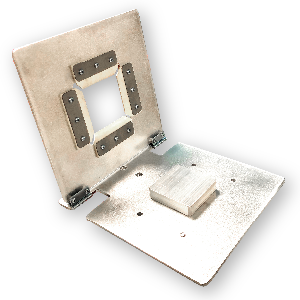
6. Evaluate Specialty Platens and Risers Separately
For sleeves, pockets, zipper hoodies, footwear, headwear, and other specialized applications, review the exact accessory instructions.
Ask:
- Which printer and base platen are supported?
- Is the item a complete platen, insert, or riser?
- What additional components are required?
- What is the usable print area?
- How is the product positioned?
- What clearance checks are required?
A hoodie riser or pocket riser should not be assumed to include the underlying garment platen.
For unusual items, request application guidance before purchasing.
7. Match Grip Pads and Tools to the Platen
Confirm the exact platen size and supported accessory before ordering a grip pad.
Review:
- Compatible platen.
- Dimensions.
- Attachment method.
- Installation instructions.
- Package contents.
Grip pads, grip tools, and complete platens are separate purchases unless the listing states otherwise.
8. Choose Curing Paper for the Intended Step
The collection includes coated ink-curing paper and uncoated pretreatment-curing paper.
Select the product specified for the task you are performing. Do not assume coated and uncoated papers are interchangeable or that either paper replaces the required curing process.
Confirm:
- Intended use.
- Sheet dimensions.
- Package quantity.
- Compatibility with your application procedure.
- Any reuse or disposal instructions.
Follow the ink, pretreatment, and equipment instructions for temperature, time, pressure, and protective layers.
9. Confirm Filter and Replacement-Part Compatibility
For an air filter or other maintenance component, match the exact product number and supported printer model.
Review:
- Printer compatibility.
- Component location.
- Package contents.
- Required quantity.
- Inspection and replacement instructions.
Do not assume that a part labeled for several Epson printer families fits every model within those families.
If you are responding to a printer message, record the exact message before requesting assistance.
10. Review Stands and Workspace Requirements
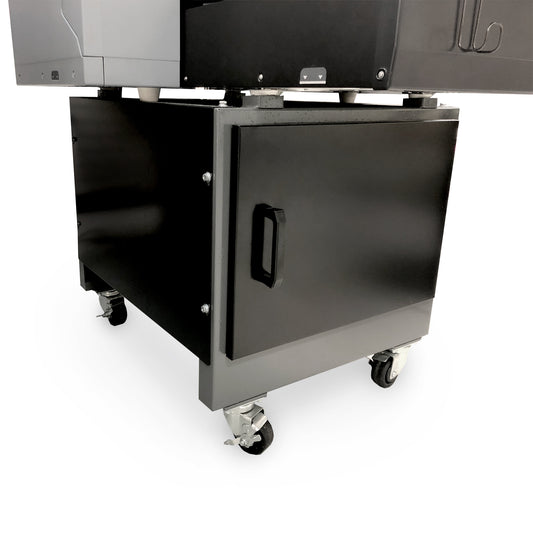
When selecting a stand, confirm equipment fit, mounting requirements, and the complete operating arrangement.
Check:
- Supported printer model.
- Stand dimensions.
- Installation instructions.
- Required working clearances.
- Access for garment loading and maintenance.
- Delivery and placement requirements.
Do not select a stand by appearance or approximate dimensions alone.
11. Verify Extended Service Plan Eligibility
Service-plan availability and coverage depend on the selected plan and printer eligibility.
Before ordering, confirm:
- Printer model and serial number.
- Existing warranty or service coverage.
- Purchase or activation deadlines.
- Coverage dates.
- Included services.
- Exclusions.
- Geographic availability.
- Claim procedures.
An extended service listing does not establish that every printer remains eligible or that every repair and maintenance item is covered.
12. Keep Troubleshooting Separate From Replenishment
If you are buying supplies because of a printing issue, describe the problem before choosing replacement items.
Useful information includes:
- Error messages.
- Photos of the affected prints.
- When the issue started.
- Recent maintenance.
- Recent ink, garment, or process changes.
- Current consumable product codes.
Replacement ink, cleaning supplies, or a new platen should follow identification of the appropriate next step—not an assumption that a purchase will resolve the issue.
Before You Order: F2100 & F2000 Compatibility Checklist
Have these details ready when contacting Lawson Workhorse Group:
- Printer: Full model name and serial number.
- Item needed: Ink, cleaning product, component, platen, accessory, stand, or service plan.
- Existing product: Cartridge code, part number, or label photos.
- Intended application: Garment type and print location.
- Artwork: Required print dimensions.
- Current platen: Manufacturer, size, and mounting details.
- Maintenance context: Routine care, printer prompt, or troubleshooting.
- Selected option: Color, size, quantity, or coverage choice.
- Product of interest: Listing name or link.
Get Help Choosing F2100 & F2000 Supplies
Contact Lawson Workhorse Group with your printer details and the product or application you are reviewing. Include clear photos of labels, accessories, or garments where useful.
Request confirmation of the exact item, compatibility, and package contents before ordering. For service plans, confirm eligibility and coverage terms separately.
Request F2100 & F2000 Product Assistance

 SaleVendor:Epson
 Vendor:Lawson Workhorse Group (LWG)
 Vendor:Lawson Workhorse Group (LWG)
 Vendor:Epson
 Vendor:Epson
 Vendor:Lawson Workhorse Group (LWG)
 Vendor:Lawson Workhorse Group (LWG)
 Vendor:Lawson Workhorse Group (LWG)
 Vendor:Lawson Workhorse Group (LWG)
 Vendor:Epson
 Vendor:Epson
 Vendor:Epson
 Vendor:Epson
 Vendor:Epson
 Vendor:Epson
 SaleVendor:Lawson Workhorse Group (LWG)
 Vendor:Epson
 Vendor:Livingston
 Vendor:Livingston
 Vendor:Livingston
 Vendor:Livingston
 Vendor:Livingston
 Vendor:Livingston
 Vendor:Livingston
 Vendor:Livingston
 Vendor:Livingston
 Vendor:Lawson Workhorse Group (LWG)
 Vendor:Lawson Workhorse Group (LWG)
 Vendor:Epson
 Vendor:Epson
 Vendor:Lawson Workhorse Group (LWG)
 Vendor:Lawson Workhorse Group (LWG)
 Vendor:Epson
 Vendor:Lawson Workhorse Group (LWG)
 Vendor:Lawson Workhorse Group (LWG)
 Vendor:Livingston


