Skip to product information
1 of 9

Prestige R1 13" DTF Printer & Packages

Prestige R1 13" DTF Printer & Packages

DTF Station

SKU:

Regular price $4,985.25 USD
Regular price $5,995.00 USD Sale price $4,985.25 USD
Sale Sold out

Payment & Security

Payment Methods Accepted

Your payment information is processed securely. We do not store credit card details nor have access to your credit card information.

Shipping, Crating, and Packaging Fees

Additional Shipping & Crating Fees

Lawson made equipment comes with a Shipping and Crating Charge that is not included in the price shown and will not be reflected in your order's total. We will contact you after order completion with a final cost.

Download Product's PDF Brochure

Financing Options

Need to finance the Prestige R1 13" DTF Printer & Packages? No problem! Visit our Financing Page for more details.

Got a question about this product?

Questions & Answers

What is the Prestige R1 DTF printer?

The Prestige R1 is a compact Direct-to-Film printer with a maximum printing width of 13 inches. It prints designs onto transfer film for heat application to compatible garments and other products.


How fast does the Prestige R1 print?


The published printing speed is 14 square feet per hour. Actual output depends on artwork size, print settings, maintenance, and the production workflow. This figure is not a guaranteed number of completed garments per hour.


Which Prestige R1 packages are available?

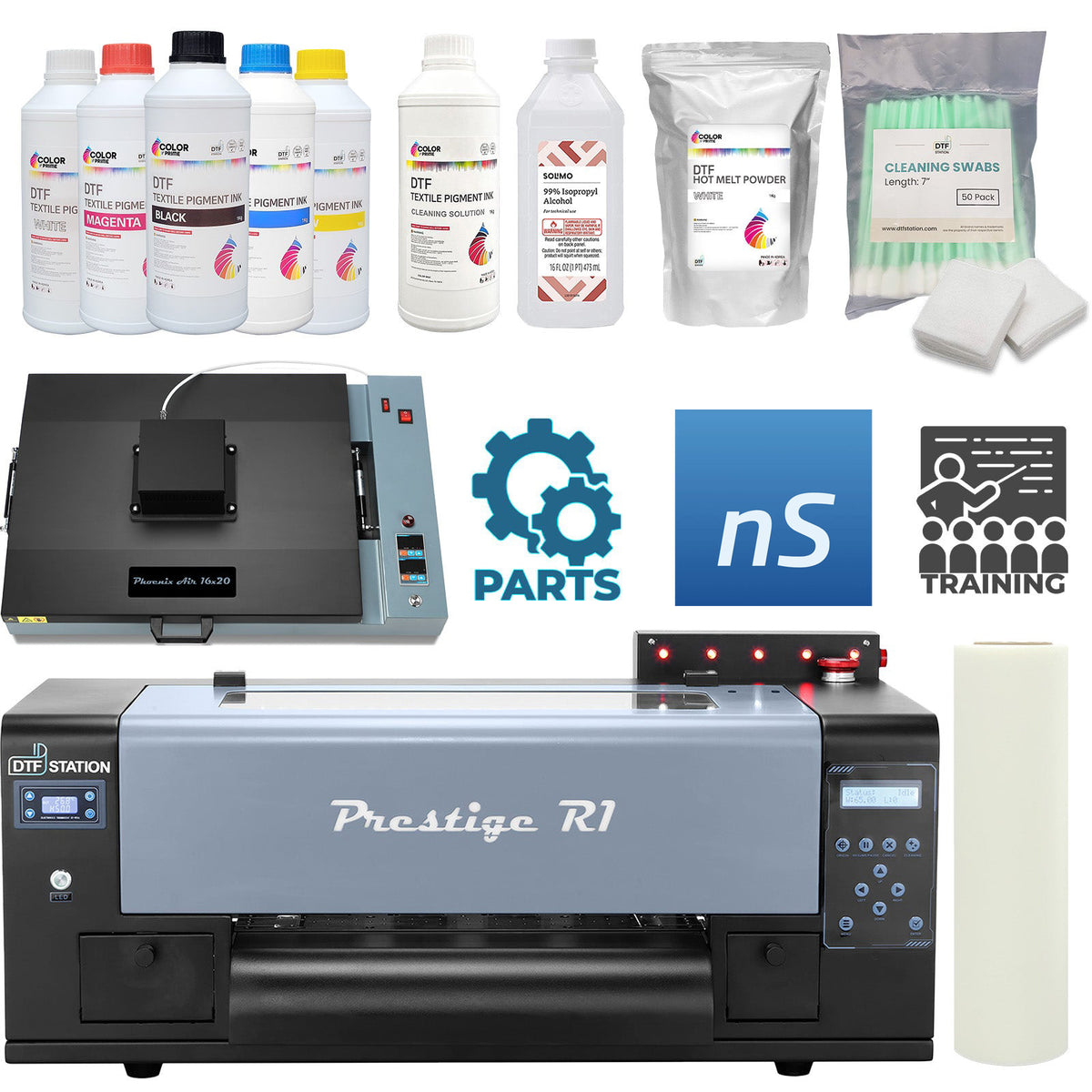
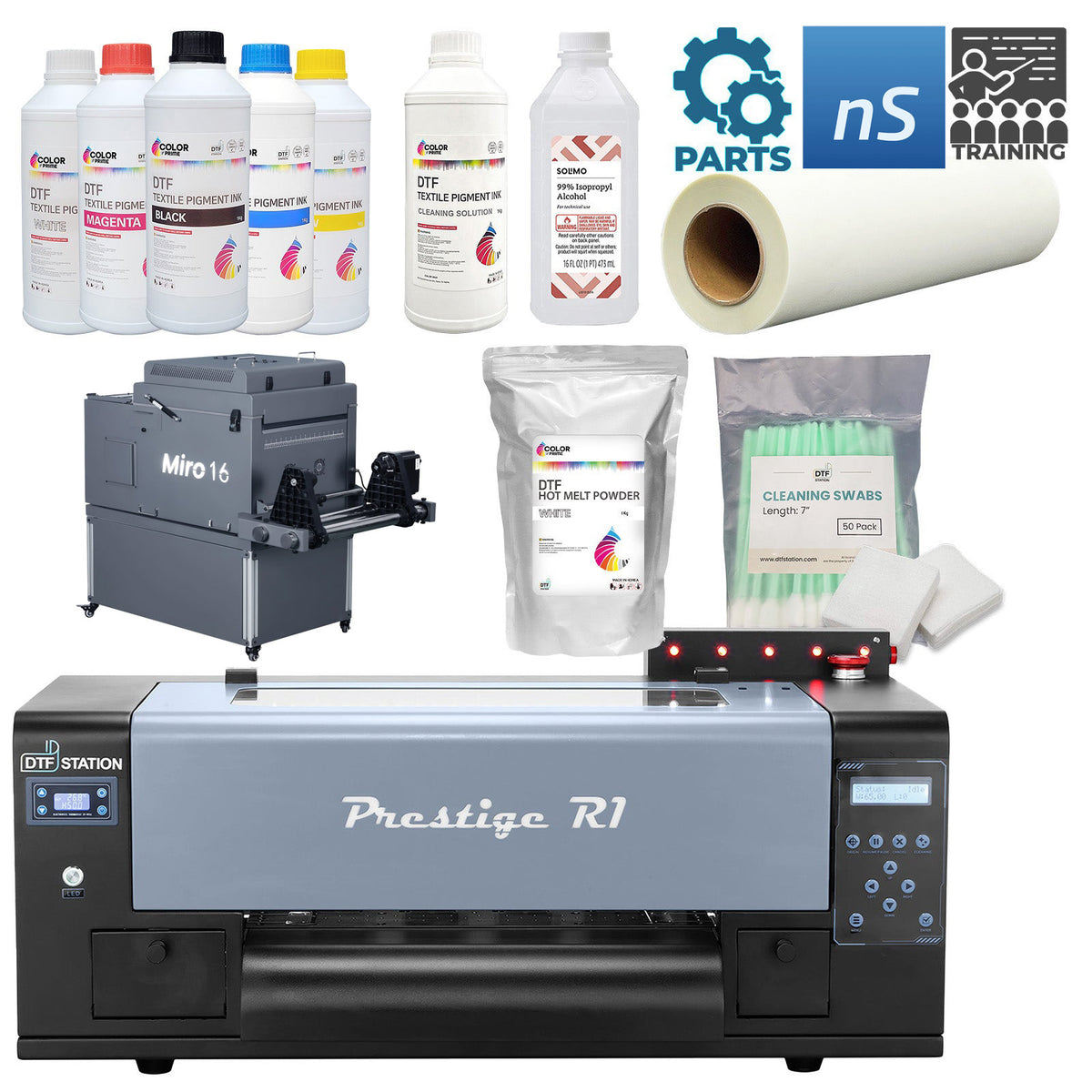
Available configurations include Printer Only (+ Training), Printer + Supplies Kit, Complete Package (Printer + Supplies + Cure Oven), Printer + Miro 13 Max + Supplies, and Printer + Miro 16 + Supplies. Review the selected package's inclusion list for the exact equipment, supplies, software, and accessories.


What is included with my selected package?


Included items depend on the package you select. Do not assume that every package includes supplies, a curing oven, a Miro shaker and dryer, software, or a table. Review the inclusion list for your selected configuration before ordering.


Can I choose Virtual Training or On-Site Training?

Yes. Select Virtual Training or On-Site Training using the product options. The training format included with your order follows your selection.


Is a DTF table included?


A table is included only when selected through the available table options. Check your selections before adding the package to your cart.


What is the difference between the curing-oven package and the Miro packages?

The curing-oven package lists a curing oven as part of the configuration. The Miro packages list a Miro 13 Max or Miro 16 shaker-and-dryer setup. Compare the equipment specifications, space requirements, and exact package contents before choosing.


Does the Prestige R1 require maintenance?

Yes. White-ink stirring and circulation, automatic cleaning, and monitoring features assist operation, but they do not eliminate routine maintenance. Follow the manufacturer's operating and maintenance instructions.


How do I choose the right Prestige R1 package?

Start by identifying the supplies and equipment you already own. Choose Printer Only if you have the supporting setup, Printer + Supplies Kit if you need starter supplies, or a curing-oven or Miro package if you need those components. Then select your training format and any optional table.


How can I confirm package contents before ordering?

Contact Lawson Workhorse Group to confirm the selected package's equipment, supplies, software, accessories, and training arrangements. Ask about any additional components needed to complete your intended workflow.

View full details

Overview

The Prestige R1 offers a maximum printing width of 13 inches and uses one Epson F1080 printhead. Published printing speeds are 14 square feet per hour at 8-pass, 720 x 1080 dpi settings and 9.69 square feet per hour at 10-pass, 720 x 1440 dpi settings. Actual output depends on artwork size, print settings, maintenance, and the production workflow.

DTF printing creates designs on transfer film for heat application to compatible garments and other products. The Prestige R1 supports custom apparel projects such as shirts, tote bags, and caps, including applications on cotton and polyester.

Choose the equipment package that fits your existing setup. Available configurations include Printer Only (+ Training), Printer + Supplies Kit, Complete Package (Printer + Supplies + Cure Oven), Printer + Miro 13 Max + Supplies, and Printer + Miro 16 + Supplies.

Select Virtual Training or On-Site Training using the options above. Included equipment, supplies, and training depend on your selected configuration. Optional tables are included only when selected.

The printer is one part of a DTF production workflow. Review your package contents to confirm which supplies, powder application equipment, curing equipment, and other components are included. A suitable heat press is also needed to apply finished transfers.

The Prestige R1 offers a maximum printing width of 13 inches and uses one Epson F1080 printhead. Published printing speeds are 14 square feet per hour at 8-pass, 720 x 1080 dpi settings and 9.69 square feet per hour at 10-pass, 720 x 1440 dpi settings. Actual output depends on artwork size, print settings, maintenance, and the production workflow.

DTF printing creates designs on transfer film for heat application to compatible garments and other products. The Prestige R1 supports custom apparel projects such as shirts, tote bags, and caps, including applications on cotton and polyester.

Choose the equipment package that fits your existing setup. Available configurations include Printer Only (+ Training), Printer + Supplies Kit, Complete Package (Printer + Supplies + Cure Oven), Printer + Miro 13 Max + Supplies, and Printer + Miro 16 + Supplies.

Select Virtual Training or On-Site Training using the options above. Included equipment, supplies, and training depend on your selected configuration. Optional tables are included only when selected.

The printer is one part of a DTF production workflow. Review your package contents to confirm which supplies, powder application equipment, curing equipment, and other components are included. A suitable heat press is also needed to apply finished transfers.

LWG Difference

Lawson Workhorse Group offers the Prestige R1 with selectable equipment packages and training options so you can choose a setup that matches your business.

Choose Your Equipment Package
Purchase the printer-only configuration if you already own the supporting equipment and supplies. Select a supplies kit, curing-oven package, or Miro package when you need additional components. Package contents vary by selection.

Choose Your Training Format
Select Virtual Training or On-Site Training according to your preferred learning format. Your selected training option determines the training included with your order.

Discuss Your Setup with LWG
Contact Lawson Workhorse Group to confirm package contents, discuss training arrangements, and identify additional equipment needed for your intended workflow. Review the published warranty, support, financing, shipping, and return information before purchasing.

Clear Package Selection
Equipment shown in product images or discussed elsewhere on the page is not automatically included with every package. Review your selected configuration and its inclusion list before adding it to your cart.

Lawson Workhorse Group offers the Prestige R1 with selectable equipment packages and training options so you can choose a setup that matches your business.

Choose Your Equipment Package
Purchase the printer-only configuration if you already own the supporting equipment and supplies. Select a supplies kit, curing-oven package, or Miro package when you need additional components. Package contents vary by selection.

Choose Your Training Format
Select Virtual Training or On-Site Training according to your preferred learning format. Your selected training option determines the training included with your order.

Discuss Your Setup with LWG
Contact Lawson Workhorse Group to confirm package contents, discuss training arrangements, and identify additional equipment needed for your intended workflow. Review the published warranty, support, financing, shipping, and return information before purchasing.

Clear Package Selection
Equipment shown in product images or discussed elsewhere on the page is not automatically included with every package. Review your selected configuration and its inclusion list before adding it to your cart.

Key Features

13-Inch Maximum Printing Width
Print transfer artwork up to 33 cm (13 inches) wide for custom apparel and other compatible applications.

Single Epson F1080 Printhead

The Prestige R1 uses one Epson F1080 printhead for its DTF printing configuration.

Two Printing Modes
Published speeds are 14 square feet per hour at 8-pass, 720 x 1080 dpi settings and 9.69 square feet per hour at 10-pass, 720 x 1440 dpi settings. Actual output varies by artwork and workflow.

White Ink Management System
Timed white-ink stirring and circulation help maintain white ink inside the printer.

Passive Auto-Cleaning
The printer performs automatic printhead maintenance every four hours while it remains powered on.

Active Auto-Cleaning
The printer can pause to clean the printhead at set intervals, including during printing.

Head Strike Sensor
A head strike sensor helps protect the printhead from damage.

Automatic Ink Alerts
The ink alert system notifies the operator when ink is running low.

Automatic Film Sensor
The printer stops printing when film runs out or is not detected.

Service-Friendly Connections
Labeled connections help identify components during service and repair.

Routine Maintenance
Automatic cleaning and ink-management features assist operation but do not replace the manufacturer's maintenance procedures.

13-Inch Maximum Printing Width
Print transfer artwork up to 33 cm (13 inches) wide for custom apparel and other compatible applications.

Single Epson F1080 Printhead

The Prestige R1 uses one Epson F1080 printhead for its DTF printing configuration.

Two Printing Modes
Published speeds are 14 square feet per hour at 8-pass, 720 x 1080 dpi settings and 9.69 square feet per hour at 10-pass, 720 x 1440 dpi settings. Actual output varies by artwork and workflow.

White Ink Management System
Timed white-ink stirring and circulation help maintain white ink inside the printer.

Passive Auto-Cleaning
The printer performs automatic printhead maintenance every four hours while it remains powered on.

Active Auto-Cleaning
The printer can pause to clean the printhead at set intervals, including during printing.

Head Strike Sensor
A head strike sensor helps protect the printhead from damage.

Automatic Ink Alerts
The ink alert system notifies the operator when ink is running low.

Automatic Film Sensor
The printer stops printing when film runs out or is not detected.

Service-Friendly Connections
Labeled connections help identify components during service and repair.

Routine Maintenance
Automatic cleaning and ink-management features assist operation but do not replace the manufacturer's maintenance procedures.

Media & Videos

Specifications

SPECIFICATION Details
Model Name Prestige R1 DTF Printer
Printing Technology Direct-to-Film (DTF)
Maximum Print Width 33 cm (13")
Printhead 1 x Epson F1080
Mainboard DTF STATION PILOT
Printing Speed — 8 Pass 720 x 1080 dpi; 1.25 m²/hour (manufacturer-listed as 14 ft²/hour)
Printing Speed — 10 Pass 720 x 1440 dpi; 0.9 m²/hour (9.69 ft²/hour)
Daily Output — 8 Pass 86 gangsheets per 8-hour working day at 720 x 1080 dpi, based on 28 x 34 cm (11" x 13") gangsheets
Daily Output — 10 Pass 64 gangsheets per 8-hour working day at 720 x 1440 dpi, based on 28 x 34 cm (11" x 13") gangsheets
RIP Software Listed neoStampa Delta RIP Software; confirm inclusion with your selected package
Power Requirements 500W; 110V 4.5A / 220V 2.3A
Machine Dimensions 85.0 x 63.8 x 44.0 cm (33.5" L x 25.1" D x 17.3" H)
Printer Weight 39.5 kg (87.1 lb)
Working Temperature 20°C to 25°C (68°F to 77°F)
Working Humidity 35%–40%
White Ink Management Timed white-ink stirring and circulation
Passive Auto-Cleaning Every four hours while the printer remains powered on
Active Auto-Cleaning Printhead cleaning at set intervals, including during printing
Printhead Protection Head strike sensor
Ink Monitoring Low-ink alert system
Film Monitoring Automatic film-detection sensor
Warranty Terms 16 months from the date shown on the CE label, excluding the printhead and any ink system-related parts
Understanding Production Figures The listed daily output is based on 11" x 13" gangsheets printed during an 8-hour working day. These figures describe printed sheets, not completed garments. Actual output varies with artwork, print settings, maintenance, and the production workflow.
Equipment Package Choose your package using the selector above. Compare the configurations in the package comparison below.
Training Format Select Virtual Training or On-Site Training.
Optional DTF Table A table is included only when selected.
Package Contents Review your selected package for included equipment, supplies, software, training, and accessories.

Comparison

PACKAGE Configuration Best Fit
Printer Only (+ Training) R1 printer with selected training You already have supplies and supporting equipment
Printer + Supplies Kit R1 printer and supplies kit You need starter supplies and already have a curing setup
Complete Package (Printer + Supplies + Cure Oven) R1 printer, supplies, and curing oven You want an oven-based curing setup
Printer + Miro 13 Max + Supplies R1 printer, Miro 13 Max, and supplies Compare the Miro 13 Max specifications and space requirements before selecting.
Printer + Miro 16 + Supplies R1 printer, Miro 16, and supplies Compare the Miro 16 specifications and space requirements before selecting.