How to Choose DTG Pretreatment & Cleaning Supplies
Start by identifying the task: preparing a garment, cleaning pretreatment equipment, or maintaining the printer. These tasks require different products and procedures.
Then match the exact supply to your fabric, equipment, and manufacturer instructions. A product’s presence in this collection does not establish that it is suitable for every printer or application.
1. Identify the Garment and Printing Requirements
Before choosing pretreatment, record:
- Printer model.
- Ink family.
- Fabric composition.
- Garment color.
- Any coating or treatment on the fabric.
- Intended ink application.
- Artwork size and coverage.
- Required finished-garment care.
Use this information to compare products. Do not choose pretreatment only from the words “light garment,” “dark garment,” or “polyester” without checking the complete application.
2. Compare Image Lock Product Options
This collection includes Image Lock Ready-for-Use, Concentrate, and CMYK pretreatment listings.
Image Lock Ready-for-Use
Review the ready-for-use option when you want a product supplied for use according to its label without a separate concentrate-mixing step.
Confirm fabric suitability, application method, and drying or pressing instructions. Do not dilute it unless the product instructions specifically direct you to do so.
Image Lock Concentrate
For concentrate, obtain the exact preparation instructions before use.
Confirm:
- Required dilution.
- Specified water quality.
- Mixing procedure.
- Prepared-solution storage.
- Application and curing instructions.
Do not apply a ratio from another pretreatment product or assume one mixture suits every fabric.
Image Lock CMYK
Review the CMYK product’s intended garment and ink applications separately.
Do not assume that “CMYK” establishes compatibility with every light garment, polyester blend, or printer. Confirm the exact fabric and process, then complete the recommended testing.
3. Review Epson Pretreatment by Product and Fabric
The collection includes Epson DTG pretreatment fluid and a separate polyester pretreatment listing.
Match the product to the exact printer, ink application, and garment requirements. Confirm whether the selected option is a concentrate or ready-to-use formulation.
Check:
- Product code.
- Supported application.
- Fabric requirements.
- Preparation instructions.
- Application procedure.
- Drying or curing method.
- Safety and handling information.
Do not assume that two Epson pretreatments share the same dilution or processing instructions.
4. Evaluate AlbaChem Sprays Individually
Alba-Pre and Alba-Bro are separate product listings. Review their documented applications rather than treating them as equivalent sprays.
Confirm:
- Intended fabric and ink application.
- Suitable application method.
- Required drying or heat treatment.
- Product limitations.
- Handling and ventilation instructions.
- Package contents.
Follow the exact label and safety documentation before use.
5. Match the Application Method to the Pretreatment
For manual application or a pretreatment machine, confirm that the product and equipment are intended to work together.
Review:
- Product preparation.
- Suitable application equipment.
- Coverage and consistency requirements.
- Garment positioning.
- Drying or pressing procedure.
- Equipment cleanup.
- Required workplace precautions.
Do not infer a universal application amount from garment size alone. Use the process instructions for your actual fabric and pretreatment.
6. Diagnose Marks and Discoloration Before Changing Products
If garments show visible boxes, staining, or other marks, document the complete process before selecting a replacement pretreatment.
Record:
- Fabric and garment color.
- Pretreatment product and preparation.
- Application method.
- Drying and pressing procedure.
- When the mark becomes visible.
- Whether it changes after printing or washing.
- Recent material or setting changes.
Do not assume that every mark has the same cause or that one product will eliminate it. Provide photos and process details when requesting assistance.
7. Keep Pretreatment Cleaner Separate From Garment Pretreatment
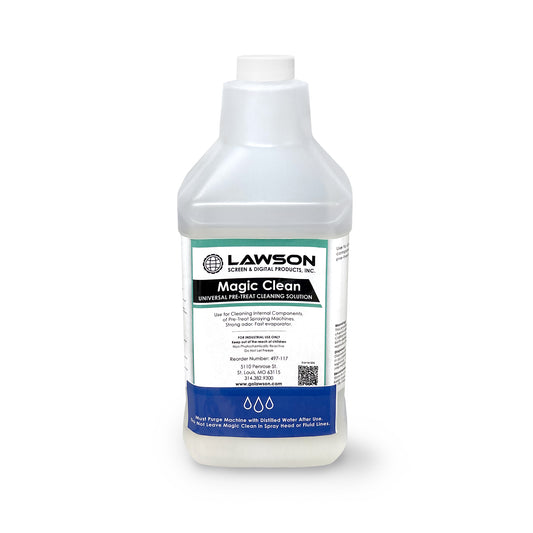
Magic Clean #485 is listed as a pretreatment cleaner, not as a garment-printing pretreatment.
Before use, confirm:
- Intended equipment or cleaning task.
- Compatibility with the components being cleaned.
- Preparation or dilution instructions.
- Application and rinsing procedure.
- Safety requirements.
The word “universal” in a product name should not be interpreted as permission to use it inside every printer or on every surface.
8. Select Printer Maintenance Products by Model and Procedure
The collection includes Epson printhead cleaning kits, a tube wash kit, a maintenance kit, and an F2000/F2100 cleaning cartridge.
These are different items. Identify the product required by your printer documentation rather than choosing from the general category.
Confirm:
- Full printer model.
- Exact maintenance task.
- Product or part number.
- Package contents.
- Required tools or fluids.
- Operator or service-technician requirements.
Do not assume that a kit identified for one Epson model is suitable for every Epson DTG or DTF printer.
9. Choose Swabs, Wipes, and Air Products for the Specific Location
Cleaning materials suitable for shop surfaces are not automatically appropriate for printheads, sensors, or internal printer components.
Before using foam swabs, wipes, or compressed-air products, check the equipment procedure for:
- Approved material.
- Intended cleaning location.
- Compatible cleaning fluid.
- Application method.
- Prohibited practices.
- Disposal instructions.
Do not use compressed air on a printer component simply because it is sold in the same collection.
10. Confirm Waste-Ink Bottle Compatibility
Match the replacement waste-ink bottle to the exact printer model and specified part number.
Review:
- Container compatibility.
- Package contents.
- Replacement instructions.
- Any required printer steps.
- Handling and disposal requirements.
Do not assume a physically similar bottle is an approved substitute.
11. Review Safety, Storage, and Purchasing Details
Read the product label, safety data sheet, and relevant equipment instructions.
Check:
- Storage conditions.
- Expiration or recommended-use information.
- Requirements after opening or mixing.
- Protective equipment and ventilation.
- Spill cleanup and disposal.
- Package size and quantity.
- Applicable purchasing and return terms.
Keep products clearly labeled. Do not transfer a fluid into an unidentified container or substitute one chemical for another based on appearance.
Before You Order: Pretreatment & Cleaning Checklist
Have these details ready when contacting Lawson Workhorse Group:
- Task: Garment pretreatment, pretreatment-equipment cleanup, or printer maintenance.
- Printer: Manufacturer and full model name.
- Ink: Installed product family.
- Garment: Fabric composition, color, and any special finish.
- Current product: Name, code, and label photos.
- Application equipment: Manual sprayer, pretreatment machine, or other setup.
- Process: Preparation, application, drying, and curing details.
- Maintenance procedure: Exact task or printer message.
- Product of interest: Listing name or link.
- Required quantity: Package size and selected option.
Get Help Choosing the Correct Product
Contact Lawson Workhorse Group with your fabric, printer, current supplies, and intended task. Include product-label photos and relevant garment or maintenance images.
For troubleshooting, describe the symptoms and recent process changes separately. Confirm the appropriate product and procedure before ordering supplies intended to resolve an issue.
Request Pretreatment & Cleaning Assistance

 Vendor:Lawson Workhorse Group (LWG)
 Vendor:Lawson Workhorse Group (LWG)
 Vendor:Lawson Workhorse Group (LWG)
 Vendor:Epson
 Vendor:Epson
 Vendor:Epson
 Vendor:Epson
 Vendor:Lawson Workhorse Group (LWG)
 Vendor:Epson
 SaleVendor:Epson
 Vendor:AlbaChem
 Vendor:AlbaChem
 Vendor:Lawson Workhorse Group (LWG)
 SaleVendor:Lawson Workhorse Group (LWG)
 Vendor:Epson
 Vendor:Lawson Workhorse Group (LWG)


